词频统计
MapReduce 的第一课
案例概览
本案例统计一段文本里每个单词出现的次数,是 MapReduce 最经典的入门案例。
业务问题
给定任意文本,回答"每个单词出现了几次"。它看起来简单,却是所有"分组 + 累加"类需求的原型——后面绝大多数案例都是把 <word, 1> 换成别的 key/value。
输入数据与预期输出
输入 bigdata.txt,3 行:
预期输出 3 行,按单词升序:
| 单词 | 次数 |
|---|---|
| a | 3 |
| b | 2 |
| c | 1 |
前置与后继
| 关系 | 案例 | 承接的知识点 |
|---|---|---|
| 本案例 | 词频统计 | 分而治之的基本形态 |
| 后继 | 分组汇总 | 把 1 换成真实数值 |
| 后继 | Combiner | 在 map 端预聚合 |
理论篇:分而治之怎么落到代码
一个思想实验
假设有 1 GB 文本、单机能数但慢。MapReduce 的做法是:把文本切成很多块,每台机器数自己那块里每个词的局部次数,最后把"同词的局部次数"加起来。
| 阶段 | 谁在做 | 产出 |
|---|---|---|
| 切块并行数 | 多个 map 任务 | 每个词一堆 <word, 局部次数> |
| 合并同词 | 框架(Shuffle) | 同词进同一个 reduce |
| 求和 | reduce 任务 | <word, 总次数> |
关键不在"数",而在"框架保证同词进同一个 reduce"——你不用自己搬数据。
map 输出的是 <单词, 1> 不是 <单词, 单词>
这是初学者最容易绕不过去的弯:value 为什么是常量 1 而不是单词本身?
| 写法 | 含义 | 问题 |
|---|---|---|
<word, word> |
把单词再发一遍 | reduce 端还得自己数个数,没意义 |
<word, 1> |
发一个计数器 | reduce 把一堆 1 加起来即可 |
1 是一个"占位计数"。后续案例里这个 1 会被换成工资、金额等真实数值,但"map 发计数、reduce 做加法"的结构不变。
框架负责排序与分组
map 输出的 <word, 1> 不会直接进 reduce。中间经过 Shuffle:框架先按 key 排序,再把相同 key 的 value 收进同一个 Iterable。
把输入 bigdata.txt 的 3 行进这四个阶段 跑一遍:
digraph MapReduce {
rankdir=LR;
compound=true;
newrank=true;
graph [fontname="Helvetica", pad=0.4, nodesep=0.4, ranksep=0.9,
splines=spline];
node [fontname="Helvetica", shape=box, style="rounded,filled",
fillcolor="#F8F9FA", color="#ADB5BD", penwidth=1.2,
margin="0.15,0.08"];
edge [fontname="Helvetica", color="#868E96", arrowsize=0.7];
subgraph cluster_in {
label="输入 bigdata.txt";
style="rounded,filled"; color="#74C0FC"; fillcolor="#E7F5FF";
I1 [label="第 1 行:a b c", group=g1];
I2 [label="第 2 行:a b", group=g2];
I3 [label="第 3 行:a", group=g3];
}
subgraph cluster_map {
label="Map 阶段";
style="rounded,filled"; color="#FFA94D"; fillcolor="#FFF4E6";
M1 [label=<<a,1> <b,1> <c,1>>, group=g1];
M2 [label=<<a,1> <b,1>>, group=g2];
M3 [label=<<a,1>>, group=g3];
}
subgraph cluster_shuffle {
label="Shuffle(框架负责)";
style="rounded,filled"; color="#FFD43B"; fillcolor="#FFF9DB";
G1 [label=<<a, [1,1,1]>>, group=g1];
G2 [label=<<b, [1,1]>>, group=g2];
G3 [label=<<c, [1]>>, group=g3];
}
subgraph cluster_reduce {
label="Reduce 阶段";
style="rounded,filled"; color="#51CF66"; fillcolor="#EBFBEE";
R1 [label="reduce:1+1+1", group=g1];
R2 [label="reduce:1+1", group=g2];
R3 [label="reduce:1", group=g3];
}
subgraph cluster_out {
label="输出 part-r-00000";
style="rounded,filled"; color="#B197FC"; fillcolor="#F3F0FF";
O1 [label="a → 3", group=g1];
O2 [label="b → 2", group=g2];
O3 [label="c → 1", group=g3];
}
// 真实数据流
I1 -> M1;
I2 -> M2;
I3 -> M3;
M1 -> G1;
M1 -> G2;
M1 -> G3;
M2 -> G1;
M2 -> G2;
M3 -> G1;
G1 -> R1 -> O1;
G2 -> R2 -> O2;
G3 -> R3 -> O3;
// 关键:不可见边,把每个 G 的入度补齐到 3 条
// G2 实际缺 M3,G3 实际缺 M2、M3
M3 -> G2 [style=invis, weight=1];
M2 -> G3 [style=invis, weight=1];
M3 -> G3 [style=invis, weight=1];
}
注意中间的交叉线:a 的 1 来自 3 个不同的 map 输出,却被收进同一个 Iterable —— 这就是"框架保证同 key 进同 reduce"。图中的 3 个 map / reduce 框是3 次调用,不是 3 个并行任务(默认 reduce 数仍是 1)。
同一条链路压缩成文字版:
map 输出:  <a,1> <b,1> <c,1> <a,1> <b,1> <a,1>
排序分组后: <a,[1,1,1]> <b,[1,1]> <c,[1]>
reduce 求和: <a,3> <b,2> <c,1>
这一步是后面所有案例的共同底座——只要 key 设计对了,聚合交给框架。
常规词频统计
先看不用 Hadoop 时,这段逻辑本来长什么样。
单机 Java 版
读文件、切词、用 HashMap 累加:
Map<String, Integer> counts = new HashMap<>();

try (BufferedReader reader = new BufferedReader(new FileReader("bigdata.txt"))) {
    String line;
    while ((line = reader.readLine()) != null) {
        for (String word : line.split(" ")) {
            counts.put(word, counts.getOrDefault(word, 0) + 1);
        }
    }
}

counts.forEach((word, count) -> System.out.println(word + "\t" + count));
直接用
FileReader每次read()只读一个字符,频繁访问磁盘效率极低。BufferedReader一次性读入一大块数据到内存缓冲区,后续读取直接从内存获取,速度提升非常明显。
它其实已经包含 map 和 reduce
| 单机版代码 | 对应的 MapReduce 阶段 |
|---|---|
line.split(" ") 后逐词处理 |
map:一行切成若干单词 |
getOrDefault(word, 0) + 1 |
reduce:同词计数累加 |
区别只在于:单机版没有显式的中间产物 <word, 1>,HashMap 把"发计数"和"加起来"两步合并成了一次 put。
它成立的前提
这段代码能跑对,是因为默认了三件事:
| 隐含假设 | 数据变大后 |
|---|---|
| 文件能被一台机器读完 | 1 TB 文本单机装不下 |
| 所有单词的结果放得进内存 | 词典一大,HashMap 先撑爆 |
| 只有一台机器在算 | 单机算力有上限,加机器没用 |
三条里任何一条不成立,这段逻辑就失效——而这正是 MapReduce 要解决的问题。
从 HashMap 到 Shuffle
| 单机 Java | MapReduce |
|---|---|
HashMap 让同词归到一起 |
Shuffle 让同 key 进同一个 reduce |
getOrDefault(word, 0) + 1 |
reduce 遍历 Iterable 累加 |
| 单机顺序读 | 文件切块,多机各读一块 |
| 结果留在内存 | 中间结果落盘,可跨机器传输 |
| 输出顺序取决于哈希 | 输出按 key 升序 |
要写的业务逻辑一行没变,变的是"谁负责把同词的数据搬到一起"。下面就用 MapReduce 重写它。
实训篇:实现词频统计
先搭骨架:继承 Mapper 类
写一个 map 任务不需要从零开始,只要继承框架提供的 Mapper,再重写它的 map 方法:
public class WordCountMapper extends Mapper<LongWritable, Text, Text, IntWritable> {
    @Override
    protected void map(LongWritable key, Text value, Context context) {
        // 只填这里:一行文本怎么变成若干 <key, value>
    }
}
分工很清楚:
-
框架负责什么时候调用你、在哪台机器上调用、数据从哪来;
-
开发者只填中间那一小段转换逻辑。
这也是 MapReduce 和自己手写并发程序最大的区别——并行部分完全不在你的代码里:框架把每个 map / reduce 任务作为一个独立的 JVM 进程,调度到不同机器上执行。你的类里没有一行进程或线程相关的代码。
尖括号里那四个泛型。它们按固定顺序规定了 map 的入参和出参:Mapper<LongWritable, Text, Text, IntWritable>
| 位置 | 泛型实参 | 作用 |
|---|---|---|
| 第 1 个 | 输入 key 的类型 | map 第一个参数的类型 |
| 第 2 个 | 输入 value 的类型 | map 第二个参数的类型 |
| 第 3 个 | 输出 key 的类型 | context.write 第一个参数的类型 |
| 第 4 个 | 输出 value 的类型 | context.write 第二个参数的类型 |
对照整条数据流向就清楚了:
另外,map 会被反复调用(每行一次),但这个类是框架只 new 一次的——map 方法里才是每次调用独立的世界。
为什么要自己包装一层类型
回头看刚才那四个位置:为什么不直接填熟悉的 String、int,而是 Text、IntWritable、LongWritable?
它们都实现了 Hadoop 的 Writable 接口。原因是 MapReduce 的 key/value 要跨网络传输、要落盘,因此必须能序列化;而 Java 原生的 String、Integer 序列化结果冗余过多,所以 Hadoop 专门定义了一套更紧凑的包装类型。
| 类型 | 对应 Java 类型 | 本案例中的角色 |
|---|---|---|
Text |
String(UTF-8) |
map 输出的单词,也是 reduce 的 key |
IntWritable |
int |
map 发出的计数 1,reduce 累加的结果 |
LongWritable |
long |
map 输入 的 key:当前行在文件中的字节偏移量 |
用法上只需记住两点:.get() 取出包装的原生值(value.get() 得到 int),构造函数直接传原生值(new IntWritable(1))。
顺带解决一个高频疑惑:
Mapper<LongWritable, ...>里的第一个LongWritable是输入行的字节偏移量,本案例用不到它——map方法从头到尾没碰过这个key。它既不是行号,也不是单词,只是 TextInputFormat 规定必须带的一个位置标记。
步骤一:准备数据
输入是纯文本,无需表头、无需特殊处理。
步骤二:实现 Mapper
每行调用一次 map,把行切成单词,每个单词发一个 <word, 1>。
String[] wordArray = value.toString().split(" ");

IntWritable one = new IntWritable(1);

for (String word : wordArray) {
    context.write(new Text(word), one);
}
步骤三:实现 Reducer
遍历同一单词的 value 列表,累加后输出一次。
int count = 0;
for (IntWritable value : values) {
    count += value.get();
}
context.write(key, new IntWritable(count));
context.write 在循环外面——每个单词只输出一行。如果误写进循环,会退化成"逐条原样输出"。
步骤四:配置作业
map 输出与最终Reduce输出的 key/value 类型在这里一致,所以两段配置看起来重复;一旦 value 类型变化(比如下一案例换成工资),两者就要分开写。
        Configuration conf = new Configuration();
        Job job = Job.getInstance(conf);

        job.setInputFormatClass(TextInputFormat.class);
        job.setOutputFormatClass(TextOutputFormat.class);

        job.setJarByClass(WordCountMain.class);
        job.setMapperClass(WordCountMapper.class);
        job.setReducerClass(WordCountReducer.class);

        job.setMapOutputKeyClass(Text.class);
        job.setMapOutputValueClass(IntWritable.class);

        job.setOutputKeyClass(Text.class);
        job.setOutputValueClass(IntWritable.class);

        FileInputFormat.setInputPaths(job, new Path(args[0]));
        FileOutputFormat.setOutputPath(job, new Path(args[1]));

        job.waitForCompletion(true);
步骤五:Windows运行调试
这样我们就可以读取本地文件,进行代码调试。
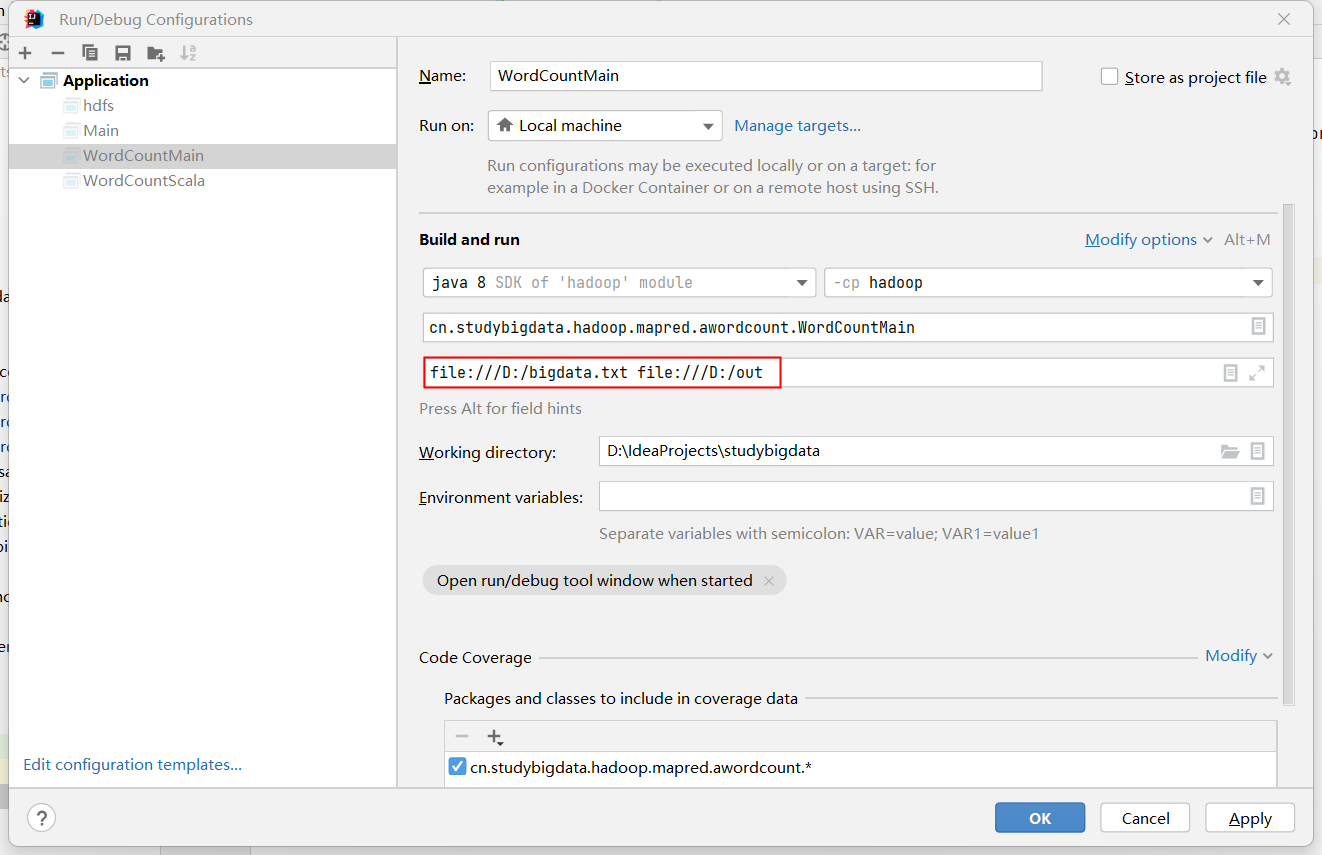
Windows本地调试时的输入输出路径格式字符串尤其要注意: file:///D:/bigdata
步骤六:配置 pom.xml
打包要办两件事:编译时找得到 Hadoop 的类,运行时找得到程序入口。
依赖只要一个:
<dependencies>
    <dependency>
        <groupId>org.apache.hadoop</groupId>
        <artifactId>hadoop-client</artifactId>
        <version>3.1.3</version>
    </dependency>
</dependencies>
hadoop-client 是聚合依赖,一次性带齐 HDFS、MapReduce、YARN 的客户端类。版本必须和集群一致,否则运行时报 NoSuchMethodError 这类错。
步骤七:指定主类并打包
光打出 jar 还不够——JVM 不知道从哪个类开始执行,运行时会报 Failed to load Main-Class manifest attribute。所以要让 maven-jar-plugin 把主类写进 META-INF/MANIFEST.MF:
<build>
    <plugins>
        <plugin>
            <groupId>org.apache.maven.plugins</groupId>
            <artifactId>maven-jar-plugin</artifactId>
            <version>2.6</version>
            <configuration>
                <archive>
                    <manifest>
                        <mainClass>com.studybigdata.hadoop.mapred.awordcount.WordCountMain</mainClass>
                    </manifest>
                </archive>
            </configuration>
        </plugin>
    </plugins>
</build>
然后打包:
产物是 target/hadoop-1.0-SNAPSHOT.jar。它只包含你自己写的类——Hadoop 的依赖由运行时提供,执行 hadoop jar 时框架会自动把它们加进 classpath,所以 jar 里不必打包。
步骤八:运行与验证
程序运行
配置好 Main-Class 后,运行命令可以省掉类名(两种写法都有效):
hadoop jar hadoop-1.0-SNAPSHOT.jar /input/bigdata.txt /output/wordcount
hadoop jar hadoop-1.0-SNAPSHOT.jar com.studybigdata.hadoop.mapred.awordcount.WordCountMain ...
别和步骤四的
job.setJarByClass(WordCountMain.class)搞混:那个告诉框架"把哪个 jar 分发到各节点",Main-Class告诉 JVM"从哪个类的main()开始跑"。两者作用不同,都得有。
进程状态
(base) [zhangsan@node0 ~]$ jps
53296 ResourceManager
103345 MRAppMaster
103509 YarnChild
52825 DataNode
52698 NameNode
53419 NodeManager
53052 SecondaryNameNode
在 Hadoop MapReduce on YARN 中,MapTask 和 ReduceTask 的 JVM 主类都显示为 YarnChild
查看结果
输出 3 行,与上面的预期一致:
核对关:行数 = 不同单词数(这里 3);每行第二个数是该词出现次数。把输入换成更大的文本,结构完全不用改。
小结
词频统计把 MapReduce 的核心结构压缩到了最小:map 发 <key, 1>,reduce 求和。
三句话回顾
- 分布式计数的关键不是"数",而是"框架保证同 key 进同 reduce"。
- value 是常量
1这样的占位计数,reduce 把它累加成总数。 - 想换统计维度,通常只改 mapper 里的一个分组键,骨架不变。
词频统计
下一内容:Block、Split、MapTask
附录
WordCount
WordCountMapper
package com.studybigdata.hadoop.mapred.awordcount;

import org.apache.hadoop.io.IntWritable;
import org.apache.hadoop.io.LongWritable;
import org.apache.hadoop.io.Text;
import org.apache.hadoop.mapreduce.Mapper;

import java.io.IOException;

public class WordCountMapper extends Mapper<LongWritable, Text, Text, IntWritable> {
    @Override
    protected void map(LongWritable key,
                       Text value,
                       Mapper<LongWritable, Text, Text, IntWritable>.Context context) throws IOException, InterruptedException {

        String[] words = value.toString().split(" ");
        for(String word: words){
            context.write(new Text(word), new IntWritable(1));
        }

    }
}
WordCountReducer
package com.studybigdata.hadoop.mapred.awordcount;

import org.apache.hadoop.io.IntWritable;
import org.apache.hadoop.io.Text;
import org.apache.hadoop.mapreduce.Reducer;

import java.io.IOException;

public class WordCountReducer extends Reducer<Text, IntWritable, Text, IntWritable> {

    @Override
    protected void reduce(Text key, Iterable<IntWritable> values, Reducer<Text, IntWritable, Text, IntWritable>.Context context) throws IOException, InterruptedException {

        int sum = 0;
        for(IntWritable value: values){
            sum += value.get();
        }
        context.write(key, new IntWritable(sum));

    }
}
WordCountMain
package com.studybigdata.hadoop.mapred.awordcount;

import org.apache.hadoop.conf.Configuration;
import org.apache.hadoop.fs.Path;
import org.apache.hadoop.io.IntWritable;
import org.apache.hadoop.io.Text;
import org.apache.hadoop.mapreduce.Job;
import org.apache.hadoop.mapreduce.lib.input.FileInputFormat;
import org.apache.hadoop.mapreduce.lib.input.TextInputFormat;
import org.apache.hadoop.mapreduce.lib.output.FileOutputFormat;
import org.apache.hadoop.mapreduce.lib.output.TextOutputFormat;

import java.io.IOException;

public class WordCountMain {
    public static void main(String[] args) throws IOException, InterruptedException, ClassNotFoundException {

        Configuration conf = new Configuration();
        Job job = Job.getInstance(conf);
        job.setInputFormatClass(TextInputFormat.class);
        job.setOutputFormatClass(TextOutputFormat.class);

        job.setJarByClass(WordCountMain.class);
        job.setMapperClass(WordCountMapper.class);
        job.setReducerClass(WordCountReducer.class);

        job.setMapOutputKeyClass(Text.class);
        job.setMapOutputValueClass(IntWritable.class);

        job.setOutputKeyClass(Text.class);
        job.setOutputValueClass(IntWritable.class);

        FileInputFormat.setInputPaths(job, new Path(args[0]));
        FileOutputFormat.setOutputPath(job, new Path(args[1]));

        job.waitForCompletion(true);

    }
}
digraph MapReduce {
rankdir=LR;
compound=true;
newrank=true;
graph [fontname="Helvetica", pad=0.4, nodesep=0.4, ranksep=0.9,
splines=spline];
node [fontname="Helvetica", shape=box, style="rounded,filled",
fillcolor="#F8F9FA", color="#ADB5BD", penwidth=1.2,
margin="0.15,0.08"];
edge [fontname="Helvetica", color="#868E96", arrowsize=0.7];
subgraph cluster_in {
label="输入 bigdata.txt";
style="rounded,filled"; color="#74C0FC"; fillcolor="#E7F5FF";
I1 [label="第 1 行:a b c", group=g1];
I2 [label="第 2 行:b c a", group=g2];
I3 [label="第 3 行:c a b", group=g3];
}
subgraph cluster_map {
label="Map 阶段";
style="rounded,filled"; color="#FFA94D"; fillcolor="#FFF4E6";
M1 [label=<<a,1> <b,1> <c,1>>, group=g1];
M2 [label=<<b,1> <c,1> <a,1>>, group=g2];
M3 [label=<<c,1> <a,1> <b,1>>, group=g3];
}
subgraph cluster_shuffle {
label="Shuffle(框架负责)";
style="rounded,filled"; color="#FFD43B"; fillcolor="#FFF9DB";
G1 [label=<<a, [1,1,1]>>, group=g1];
G2 [label=<<b, [1,1,1]>>, group=g2];
G3 [label=<<c, [1,1,1]>>, group=g3];
}
subgraph cluster_reduce {
label="Reduce 阶段";
style="rounded,filled"; color="#51CF66"; fillcolor="#EBFBEE";
R1 [label="reduce:1+1+1", group=g1];
R2 [label="reduce:1+1+1", group=g2];
R3 [label="reduce:1+1+1", group=g3];
}
subgraph cluster_out {
label="输出 part-r-00000";
style="rounded,filled"; color="#B197FC"; fillcolor="#F3F0FF";
O1 [label="a → 3", group=g1];
O2 [label="b → 3", group=g2];
O3 [label="c → 3", group=g3];
}
I1 -> M1;
I2 -> M2;
I3 -> M3;
// 每个 M 都发射 a、b、c,完全对称
M1 -> G1;
M1 -> G2;
M1 -> G3;
M2 -> G1;
M2 -> G2;
M2 -> G3;
M3 -> G1;
M3 -> G2;
M3 -> G3;
G1 -> R1 -> O1;
G2 -> R2 -> O2;
G3 -> R3 -> O3;
}