块大小 默认块大小
版本
大小
1.x
64MB
2.x/3.x
128MB
本地
32MB
根据硬盘速度配置块大小
硬盘类型
硬盘速度
建议Block大小
普通机械硬盘
100MB/s
128MB
固态硬盘(普通)
300MB/s
256MB
固态硬盘(高级)
600MB/s
512MB
文件实际占用Linux文件系统的空间 当一个文件小于128MB时,占用Linux文件系统多少存储空间?
答:占用实际的磁盘存储,而不是Block大小。
https://blog.csdn.net/m0_67391120/article/details/126599677
NameNode与DataNode
DataNode 启动时,向NameNode 汇报本节点中托管的Block的情况,此后,默认每6小时汇报一次。DataNode 启动后,每3s 向NameNode 发送一次心跳信号,当NameNode 在 10分钟+30s 未收到心跳信号时,认为DataNode 挂掉。DataNode默认超时时间:
Timeout = 2* dfs.namenode.heartbeat.recheck-interval + 10 * dfs.heartbeat.interval
property
value
description
dfs.blockreport.intervalMsec
21600000
Determines block reporting interval in milliseconds.
dfs.datanode.directoryscan.interval
21600000
Interval in seconds for Datanode to scan data directories and reconcile the difference between blocks in memory and on the disk. Support multiple time unit suffix(case insensitive), as described in dfs.heartbeat.interval.If no time unit is specified then seconds is assumed.
dfs.namenode.heartbeat.recheck-interval
300000
This time decides the interval to check for expired datanodes. With this value and dfs.heartbeat.interval, the interval of deciding the datanode is stale or not is also calculated. The unit of this configuration is millisecond.
dfs.heartbeat.interval
3
Determines datanode heartbeat interval in seconds. Can use the following suffix (case insensitive): ms(millis), s(sec), m(min), h(hour), d(day) to specify the time (such as 2s, 2m, 1h, etc.). Or provide complete number in seconds (such as 30 for 30 seconds). If no time unit is specified then seconds is assumed.
NameNode内存 内存估算方式 每个Block在NameNode中占用150Byte存储空间。
128G 内存大约能存储128 * 1024 * 1024 * 1024 / 150Byte ≈ 9.1 亿 文件块。
默认内存大小
Hadoop版本
默认值
Hadoop 2.x
2000MB
Hadoop 3.x
动态分配
内存配置建议 NameNode最小内存1GB,每增加100万个文件,增加1GB内存。
配置文件 hadoop-env.sh
配置项 HADOOP_NAMENODE_OPTS=-Xmx3072m # 配置NameNode使用3GB内存。
查看内存占用情况 1 2 # jps查看NameNode的进程号 $ jmap -heap pid
https://blog.csdn.net/weixin_45417821/article/details/121041810
NameNode线程池 NameNode工作线程池
处理DataNode的并发心跳
客户端的并发增删改的操作
配置项 1 2 3 4 5 6 <property > <name > dfs.namenode.handler.count</name > <value > 10</value > <description > The number of Namenode RPC server threads that listen to requests from clients. If dfs.namenode.servicerpc-address is not configured then Namenode RPC server threads listen to requests from all nodes. </description > </property >
开启多少个线程能达到集群最佳性能状态呢? dfs.namenode.handler.count = 20*log(n)
其中,n为集群中DataNode的个数
1 2 3 # 使用SQL 计算, select floor (20 * log (3 ))# 三台DataNode,可配置线程数为21
纠删码 一个具有6个块的3x复制文件将消耗6 * 3 = 18个磁盘空间。但是,使用EC(6个数据,3个奇偶校验)部署时,它将仅消耗9个磁盘空间块。
缺点
https://codeleading.com/article/74064998837/
https://blog.51cto.com/u_12279910/4218156
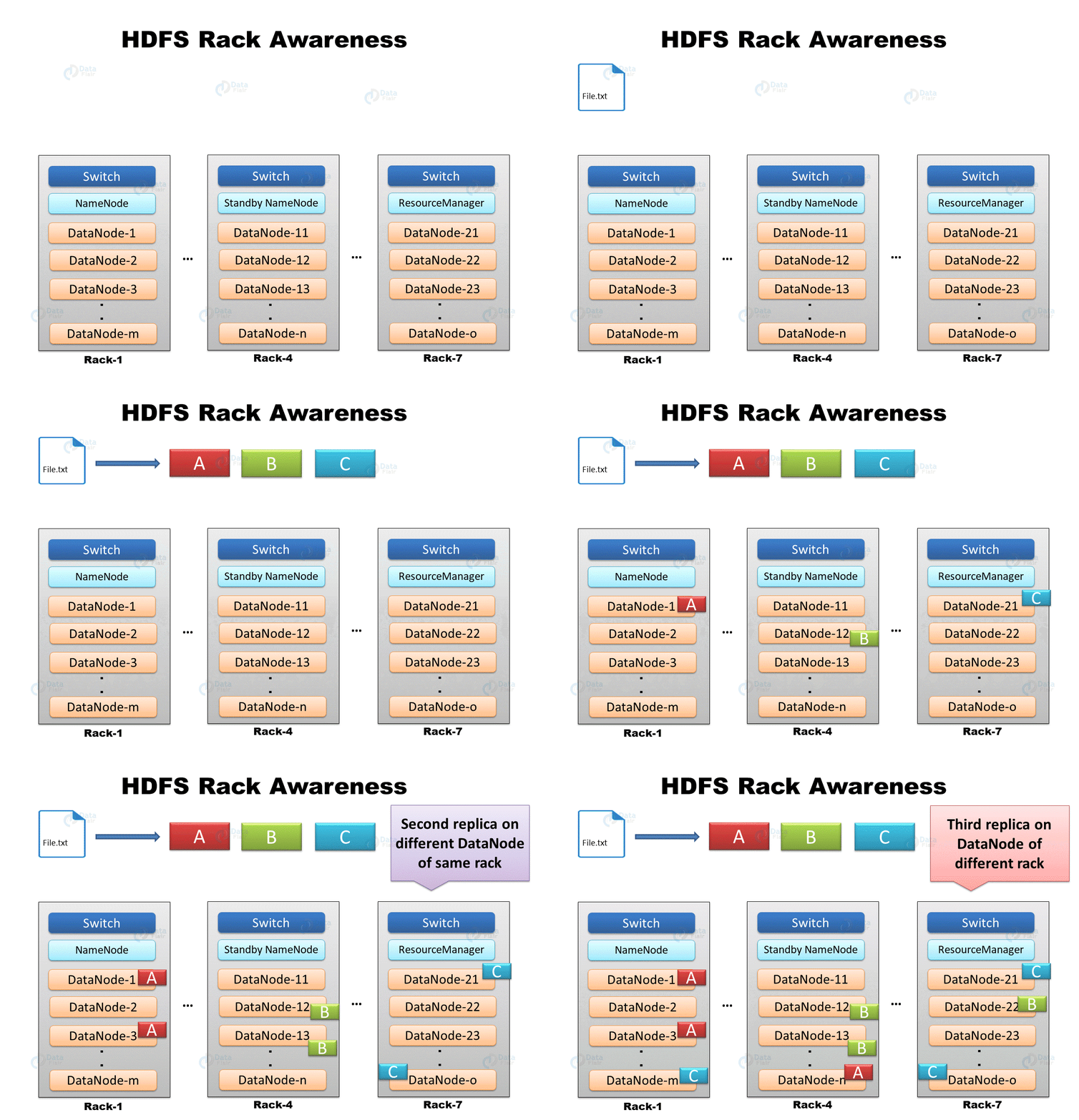
机架感知 机架感知 :副本存储节点的选择。
1 org.apache.hadoop.hdfs.server.blockmanagement.BlockPlacementPolicyDefault.chooseTargetInOrder
第一个副本在Client所处的节点。如果客户端在集群外,随机选一个。
第二个副本在另一个机架的随机一个节点。
第三个副本在第二个副本所在机架的随机节点。
第一个和第二个的策略是为了数据可靠性。
第二个和第三个在同一机架是为了数据读写效率。
节点距离计算 节点距离 : 两个节点 到达最近共同祖先节点 的距离总和。
Distance(/d1/r1/n1 , /d1/r1/n1) = 0 (process on the same node)
Distance*(/d1/r1/n1 , /d1/r1/n2)* = 2 (different nodes on same rack)
Distance(/d1/r1/n1 , /d1/r2/n3) = 4 (nodes on different racks in the same data center)
Distance(/d1/r1/n1 , /d2/r3/n4) = 6 (nodes on different data centers)
HDFS用户 超级用户 If you started the NameNode, then you are the super-user.
谁启动NameNode,谁就是Hadoop中的超级用户。
用户身份 The identity of a client process is determined by the host operating system. On Unix-like systems, the user name is the equivalent of whoami.
客户端进程在HDFS上的身份由主机操作系统确定。在类 Unix 系统上,用户名相当于 whoami。
https://hadoop.apache.org/docs/current/hadoop-project-dist/hadoop-hdfs/HdfsPermissionsGuide.html
supergroup 1 2 3 4 5 6 7 8 9 10 11 12 13 14 15 16 # 添加普通用户 [root@node0 ~]# useradd Qingyuan_Qu [root@node0 ~]# passwd Qingyuan_Qu # 增加用户组 [root@node0 ~]# groupadd supergroup # 将用户加入用户组 [root@node0 ~]# usermod -a -G supergroup Qingyuan_Qu # 查看添加结果 [root@node0 ~]# id Qingyuan_Qu uid=1002(Qingyuan_Qu) gid=1002(Qingyuan_Qu) groups=1002(Qingyuan_Qu),1003(supergroup) # 刷新Linux用户到HDFS (python37) [zhangsan@node0 ~]$ hdfs dfsadmin -refreshUserToGroupsMappings Refresh user to groups mapping successful
启用回收站
property
default
comment
fs.trash.interval0
保留时间(默认关闭,单位分钟)
fs.trash.checkpoint.interval0
垃圾回收的检查时间间隔,一般小于保留时间
回收站位置:/user/$USER/.Trash/Current/
对应配置文件:
core-site.xml
hdfs 命令分类
https://hadoop.apache.org/docs/r2.10.0/hadoop-project-dist/hadoop-hdfs/HDFSCommands.html
用户命令 dfs hdfs dfs [options]
run a filesystem command on the file systems supported in Hadoop.
作用
命令
-help [cmd ...]
文件系统间交互 -put [-f] [-p] [-l] <localsrc> ... <dst>
-copyFromLocal [-f] [-p] [-l] <localsrc> ... <dst>
-moveFromLocal <localsrc> ... <dst>
-moveToLocal <src> <localdst>
-get [-p] [-ignoreCrc] [-crc] <src> ... <localdst>
-copyToLocal [-p] [-ignoreCrc] [-crc] <src> ... <localdst>
-appendToFile <localsrc> ... <dst>
-getmerge [-nl] <src> <localdst>
文件管理 -mkdir [-p] <path> ...
-ls [-d] [-h] [-R] [<path> ...]
-touchz <path> ...
-cat [-ignoreCrc] <src> ...
-tail [-f] <file>
-cp [-f] [-p] <src> ... <dst>
-mv <src> ... <dst>
`-rm [-f] [-r
-rmdir [--ignore-fail-on-non-empty] <dir> ...
-count [-q] [-h] <path> ...
文件校验 -checksum <src> ...
权限 -chown [-R] [OWNER][:[GROUP]] PATH...
-chgrp [-R] GROUP PATH...
`-chmod [-R] <MODE[,MODE]…
快照 -createSnapshot <snapshotDir> [<snapshotName>]
-renameSnapshot <snapshotDir> <oldName> <newName>
-deleteSnapshot <snapshotDir> <snapshotName>
-df [-h] [<path> ...]
-du [-s] [-h] <path> ...
清空回收站 -expunge
文件查找 -find <path> ... <expression> ...
访问控制列表 -getfacl [-R] <path>
`-setfacl [-R] [{-b
扩展属性 `-setfattr { -n name [ -v value]
`-getfattr [-R] { -n name
副本 -setrep [-R] [-w] <rep> <path> ...
文件统计 -stat [format] <path> ...
存在判断 -test -[defsz] <path>
-text [-ignoreCrc] <src> ...
文件截断 -truncate [-w] <length> <path> ...
-usage [cmd ...]
https://hadoop.apache.org/docs/stable/hadoop-project-dist/hadoop-hdfs/HDFSCommands.html#User_Commands
扩展属性*(缩写为*xattrs)是一种文件系统功能,允许用户应用程序将附加元数据与文件或目录相关联。与文件权限或修改时间等系统级 inode 元数据不同,扩展属性不由系统解释,而是由应用程序用于存储有关 inode 的附加信息。例如,可以使用扩展属性来指定纯文本文档的字符编码。
HDFS 中的扩展属性以 Linux 中的扩展属性为模型(参见attr(5) 的 Linux 手册页和相关文档 )。
设置扩展属性 1 hdfs dfs -setfattr -n name [-v value] <path>
设置文件或目录的扩展属性名和属性值。
-n:属性名,要以user/trusted/security/system/raw。比如 user.from
-v: 属性值
-x: 删除文件的扩展属性
1 2 3 4 5 6 # 使用HDFS的超级用户zhangsan设置扩展属性trusted.url [zhangsan@node1 current]$ hdfs dfs -setfattr /user/zhangsan/hadoop-2.7.3.tar.gz -n trusted.url -v http://hadoop.apache.org # 使用普通用户lisi设置扩展属性trusted.url [lisi@node1 ~]$ hdfs dfs -setfattr /user/zhangsan/hadoop-2.7.3.tar.gz -n trusted.url -v https://hadoop.apache.org setfattr: User doesn't have permission for xattr: trusted.url
获取扩展属性 1 hdfs dfs -getfattr [-n name | -d ] [-e en] <path>
-d : 显示所有属性
-e: encoding , 属性值以指定的编码输出。text / hex / base64
1 2 3 [zhangsan@node1 ~]$ hdfs dfs -getfattr /user/zhangsan/hadoop-2.7.3.tar.gz -n trusted.url # file: /user/zhangsan/hadoop-2.7.3.tar.gz trusted.url="http://hadoop.apache.org"
再次观察edits
解析edits的方法见后面 管理员命令 - dfsadmin - oev
1 2 3 4 5 6 7 8 9 10 11 12 13 14 <RECORD > <OPCODE > OP_SET_XATTR</OPCODE > <DATA > <TXID > 17</TXID > <SRC > /user/zhangsan/hadoop-2.7.3.tar.gz</SRC > <XATTR > <NAMESPACE > TRUSTED</NAMESPACE > <NAME > url</NAME > <VALUE > 0x687474703a2f2f6861646f6f702e6170616368652e6f7267</VALUE > </XATTR > <RPC_CLIENTID > 684c122e-8f0a-4109-aabb-330393434684</RPC_CLIENTID > <RPC_CALLID > 1</RPC_CALLID > </DATA > </RECORD >
hdfs namenode -format
格式化后会在hadoop.tmp.dir目录产生fsiamge文件
1 2 3 4 5 6 7 8 [zhangsan@node1 ~]$ cd /opt/bigdata/hadoop/default/dfs/name/current [zhangsan@node1 current]$ ll total 16 -rw-rw-r--. 1 zhangsan zhangsan 355 Oct 1 05:56 fsimage_0000000000000000000 -rw-rw-r--. 1 zhangsan zhangsan 62 Oct 1 05:56 fsimage_0000000000000000000.md5 -rw-rw-r--. 1 zhangsan zhangsan 2 Oct 1 05:56 seen_txid -rw-rw-r--. 1 zhangsan zhangsan 207 Oct 1 05:56 VERSION
接下来我们使用工具查看每个文件的内容。
oiv Offline Image Viewer(oiv)hdfs的fsimage文件的内容转储为人类可读的格式的工具。支持多种Processor解析方式:Web processor, XML Processor, Delimited Processor, FileDistribution Processor等。
使用方法 bin/hdfs oiv -p XML -i fsimage -o fsimage.xml
-p|--processor processor -i|--inputFile input file -o|--outputFile output file -h | --help
使用案例 XML Processor 1 [zhangsan@node1 current]$ hdfs oiv -i fsimage_0000000000000000000 -p XML -o ~/fsimage_0000000000000000000.xml
fsimage_0000000000000000000.xml 文件内容:
1 2 3 4 5 6 7 8 9 10 11 12 13 14 15 16 17 18 19 20 21 22 23 24 25 26 27 28 29 30 31 32 33 34 35 36 37 38 39 40 41 [zhangsan@node1 current]$ cat ~/fsimage_0000000000000000000.xml <?xml version="1.0" ?> <fsimage > <NameSection > <genstampV1 > 1000</genstampV1 > <genstampV2 > 1000</genstampV2 > <genstampV1Limit > 0</genstampV1Limit > <lastAllocatedBlockId > 1073741824</lastAllocatedBlockId > <txid > 0</txid > </NameSection > <INodeSection > <lastInodeId > 16385</lastInodeId > <inode > <id > 16385</id > <type > DIRECTORY</type > <name > </name > <mtime > 0</mtime > <permission > zhangsan:supergroup:rwxr-xr-x</permission > <nsquota > 9223372036854775807</nsquota > <dsquota > -1</dsquota > </inode > </INodeSection > <INodeReferenceSection > </INodeReferenceSection > <SnapshotSection > <snapshotCounter > 0</snapshotCounter > </SnapshotSection > <INodeDirectorySection > </INodeDirectorySection > <FileUnderConstructionSection > </FileUnderConstructionSection > <SnapshotDiffSection > <diff > <inodeid > 16385</inodeid > </diff > </SnapshotDiffSection > <SecretManagerSection > <currentId > 0</currentId > <tokenSequenceNumber > 0</tokenSequenceNumber > </SecretManagerSection > <CacheManagerSection > <nextDirectiveId > 1</nextDirectiveId > </CacheManagerSection > </fsimage >
FileDistribution Processor 1 [zhangsan@node1 current]$ hdfs oiv -i fsimage_0000000000000000000 -p FileDistribution -o ~/fsimage_0000000000000000000.fd
1 2 3 4 5 6 7 8 [zhangsan@node1 current]$ cat ~/fsimage_0000000000000000000.fd Processed 0 inodes. Size NumFiles totalFiles = 0 totalDirectories = 1 totalBlocks = 0 totalSpace = 0 maxFileSize = 0
Delimited Processor 1 [zhangsan@node1 current]$ hdfs oiv -i fsimage_0000000000000000000 -p Delimited -o ~/fsimage_0000000000000000000.delimited
1 2 [zhangsan@node1 current]$ cat ~/fsimage_0000000000000000000.delimited / 0 1970-01-01 08:00 1970-01-01 08:00 0 0 0 9223372036854775807 -1 rwxr-xr-x zhangsan supergroup
注意:image 中不会保存Block 的分布情况;
而是,DataNode 启动时,向NameNode 汇报本节点中托管的Block的情况。
oev edits文件中记录了HDFS的操作日志,现在HDFS中没有任何文件,我们创建文件夹/user/zhangsan,在创建文件前,先启动HDFS。
Offline Edits Viewer(oev)Edits日志文件的工具。支持多种Processor解析方式:XML, stats等,
XML Processor为默认Processor。
Stats Processor用于汇总edits日志文件中包含的OP CODE的计数。
使用方法 bin/hdfs oev -p xml -i edits -o edits.xml
使用案例 创建文件夹 创建文件夹/user/zhangsan
1 [zhangsan@node1 current]$ hdfs oev -i edits_inprogress_0000000000000000001 -p XML -o ~/edits_inprogress_0000000000000000001.xml
查看edits 1 2 3 4 5 6 7 8 9 10 11 12 13 14 15 16 17 18 19 20 21 22 23 24 25 26 27 28 29 30 31 32 33 34 35 36 37 38 39 40 41 [zhangsan@node1 current]$ cat ~/edits_inprogress_0000000000000000001.xml <?xml version="1.0" encoding="UTF-8" ?> <EDITS > <EDITS_VERSION > -63</EDITS_VERSION > <RECORD > <OPCODE > OP_START_LOG_SEGMENT</OPCODE > <DATA > <TXID > 1</TXID > </DATA > </RECORD > <RECORD > <OPCODE > OP_MKDIR</OPCODE > <DATA > <TXID > 2</TXID > <LENGTH > 0</LENGTH > <INODEID > 16386</INODEID > <PATH > /user</PATH > <TIMESTAMP > 1649034484846</TIMESTAMP > <PERMISSION_STATUS > <USERNAME > zhangsan</USERNAME > <GROUPNAME > supergroup</GROUPNAME > <MODE > 493</MODE > </PERMISSION_STATUS > </DATA > </RECORD > <RECORD > <OPCODE > OP_MKDIR</OPCODE > <DATA > <TXID > 3</TXID > <LENGTH > 0</LENGTH > <INODEID > 16387</INODEID > <PATH > /user/zhangsan</PATH > <TIMESTAMP > 1649034484856</TIMESTAMP > <PERMISSION_STATUS > <USERNAME > zhangsan</USERNAME > <GROUPNAME > supergroup</GROUPNAME > <MODE > 493</MODE > </PERMISSION_STATUS > </DATA > </RECORD > </EDITS >
上传文件 上传hadoop-2.7.3.tar.gz到hdfs://node1:9000/user/zhangsan/
1 [zhangsan@node1 current]$ hdfs dfs -put /opt/bigdata/hadoop/hadoop-2.7.3.tar.gz /user/zhangsan
再次查看edits 1 2 3 4 5 6 7 8 9 10 11 12 13 14 15 16 17 18 19 20 21 22 23 24 25 26 27 28 29 30 31 32 33 34 35 36 37 38 39 40 41 42 43 44 45 46 47 48 49 50 51 52 53 54 55 56 57 58 59 60 61 62 63 64 65 66 67 68 69 70 71 72 73 74 75 76 77 78 79 80 81 82 83 84 85 86 87 88 89 90 91 92 93 94 95 96 97 98 99 100 101 102 103 104 105 106 107 108 109 110 111 112 113 114 115 116 117 118 119 120 121 122 123 124 125 126 127 128 129 130 131 132 133 134 135 136 137 138 139 140 141 142 143 144 145 146 147 148 149 150 151 152 153 154 155 156 157 158 159 160 161 162 163 164 165 166 167 <?xml version="1.0" encoding="UTF-8" ?> <EDITS > <EDITS_VERSION > -63</EDITS_VERSION > <RECORD > <OPCODE > OP_START_LOG_SEGMENT</OPCODE > <DATA > <TXID > 1</TXID > </DATA > </RECORD > <RECORD > <OPCODE > OP_MKDIR</OPCODE > <DATA > <TXID > 2</TXID > <LENGTH > 0</LENGTH > <INODEID > 16386</INODEID > <PATH > /user</PATH > <TIMESTAMP > 1649034484846</TIMESTAMP > <PERMISSION_STATUS > <USERNAME > zhangsan</USERNAME > <GROUPNAME > supergroup</GROUPNAME > <MODE > 493</MODE > </PERMISSION_STATUS > </DATA > </RECORD > <RECORD > <OPCODE > OP_MKDIR</OPCODE > <DATA > <TXID > 3</TXID > <LENGTH > 0</LENGTH > <INODEID > 16387</INODEID > <PATH > /user/zhangsan</PATH > <TIMESTAMP > 1649034484856</TIMESTAMP > <PERMISSION_STATUS > <USERNAME > zhangsan</USERNAME > <GROUPNAME > supergroup</GROUPNAME > <MODE > 493</MODE > </PERMISSION_STATUS > </DATA > </RECORD > <RECORD > <OPCODE > OP_ADD</OPCODE > <DATA > <TXID > 4</TXID > <LENGTH > 0</LENGTH > <INODEID > 16388</INODEID > <PATH > /user/zhangsan/hadoop-2.7.3.tar.gz._COPYING_</PATH > <REPLICATION > 3</REPLICATION > <MTIME > 1649035096135</MTIME > <ATIME > 1649035096135</ATIME > <BLOCKSIZE > 134217728</BLOCKSIZE > <CLIENT_NAME > DFSClient_NONMAPREDUCE_-297911069_1</CLIENT_NAME > <CLIENT_MACHINE > 192.168.179.101</CLIENT_MACHINE > <OVERWRITE > true</OVERWRITE > <PERMISSION_STATUS > <USERNAME > zhangsan</USERNAME > <GROUPNAME > supergroup</GROUPNAME > <MODE > 420</MODE > </PERMISSION_STATUS > <RPC_CLIENTID > c2ab8d7c-26da-42c8-a479-121dc16a21aa</RPC_CLIENTID > <RPC_CALLID > 3</RPC_CALLID > </DATA > </RECORD > <RECORD > <OPCODE > OP_ALLOCATE_BLOCK_ID</OPCODE > <DATA > <TXID > 5</TXID > <BLOCK_ID > 1073741825</BLOCK_ID > </DATA > </RECORD > <RECORD > <OPCODE > OP_SET_GENSTAMP_V2</OPCODE > <DATA > <TXID > 6</TXID > <GENSTAMPV2 > 1001</GENSTAMPV2 > </DATA > </RECORD > <RECORD > <OPCODE > OP_ADD_BLOCK</OPCODE > <DATA > <TXID > 7</TXID > <PATH > /user/zhangsan/hadoop-2.7.3.tar.gz._COPYING_</PATH > <BLOCK > <BLOCK_ID > 1073741825</BLOCK_ID > <NUM_BYTES > 0</NUM_BYTES > <GENSTAMP > 1001</GENSTAMP > </BLOCK > <RPC_CLIENTID > </RPC_CLIENTID > <RPC_CALLID > -2</RPC_CALLID > </DATA > </RECORD > <RECORD > <OPCODE > OP_ALLOCATE_BLOCK_ID</OPCODE > <DATA > <TXID > 8</TXID > <BLOCK_ID > 1073741826</BLOCK_ID > </DATA > </RECORD > <RECORD > <OPCODE > OP_SET_GENSTAMP_V2</OPCODE > <DATA > <TXID > 9</TXID > <GENSTAMPV2 > 1002</GENSTAMPV2 > </DATA > </RECORD > <RECORD > <OPCODE > OP_ADD_BLOCK</OPCODE > <DATA > <TXID > 10</TXID > <PATH > /user/zhangsan/hadoop-2.7.3.tar.gz._COPYING_</PATH > <BLOCK > <BLOCK_ID > 1073741825</BLOCK_ID > <NUM_BYTES > 134217728</NUM_BYTES > <GENSTAMP > 1001</GENSTAMP > </BLOCK > <BLOCK > <BLOCK_ID > 1073741826</BLOCK_ID > <NUM_BYTES > 0</NUM_BYTES > <GENSTAMP > 1002</GENSTAMP > </BLOCK > <RPC_CLIENTID > </RPC_CLIENTID > <RPC_CALLID > -2</RPC_CALLID > </DATA > </RECORD > <RECORD > <OPCODE > OP_CLOSE</OPCODE > <DATA > <TXID > 11</TXID > <LENGTH > 0</LENGTH > <INODEID > 0</INODEID > <PATH > /user/zhangsan/hadoop-2.7.3.tar.gz._COPYING_</PATH > <REPLICATION > 3</REPLICATION > <MTIME > 1649035103318</MTIME > <ATIME > 1649035096135</ATIME > <BLOCKSIZE > 134217728</BLOCKSIZE > <CLIENT_NAME > </CLIENT_NAME > <CLIENT_MACHINE > </CLIENT_MACHINE > <OVERWRITE > false</OVERWRITE > <BLOCK > <BLOCK_ID > 1073741825</BLOCK_ID > <NUM_BYTES > 134217728</NUM_BYTES > <GENSTAMP > 1001</GENSTAMP > </BLOCK > <BLOCK > <BLOCK_ID > 1073741826</BLOCK_ID > <NUM_BYTES > 79874467</NUM_BYTES > <GENSTAMP > 1002</GENSTAMP > </BLOCK > <PERMISSION_STATUS > <USERNAME > zhangsan</USERNAME > <GROUPNAME > supergroup</GROUPNAME > <MODE > 420</MODE > </PERMISSION_STATUS > </DATA > </RECORD > <RECORD > <OPCODE > OP_RENAME_OLD</OPCODE > <DATA > <TXID > 12</TXID > <LENGTH > 0</LENGTH > <SRC > /user/zhangsan/hadoop-2.7.3.tar.gz._COPYING_</SRC > <DST > /user/zhangsan/hadoop-2.7.3.tar.gz</DST > <TIMESTAMP > 1649035103337</TIMESTAMP > <RPC_CLIENTID > c2ab8d7c-26da-42c8-a479-121dc16a21aa</RPC_CLIENTID > <RPC_CALLID > 9</RPC_CALLID > </DATA > </RECORD > </EDITS >
image和edits产生时间 1 2 3 4 5 6 7 8 9 10 11 12 13 14 15 [zhangsan@node1 current]$ ls -lh total 1.1M -rw-rw-r--. 1 zhangsan zhangsan 42 Oct 1 18:43 edits_0000000000000000001-0000000000000000002 -rw-rw-r--. 1 zhangsan zhangsan 201 Oct 1 19:43 edits_0000000000000000003-0000000000000000006 -rw-rw-r--. 1 zhangsan zhangsan 3.0K Oct 1 20:43 edits_0000000000000000007-0000000000000000041 -rw-rw-r--. 1 zhangsan zhangsan 1.0M Oct 1 20:48 edits_inprogress_0000000000000000042 -rw-rw-r--. 1 zhangsan zhangsan 498 Oct 1 19:43 fsimage_0000000000000000006 -rw-rw-r--. 1 zhangsan zhangsan 62 Oct 1 19:43 fsimage_0000000000000000006.md5 -rw-rw-r--. 1 zhangsan zhangsan 929 Oct 1 20:43 fsimage_0000000000000000041 -rw-rw-r--. 1 zhangsan zhangsan 62 Oct 1 20:43 fsimage_0000000000000000041.md5 -rw-rw-r--. 1 zhangsan zhangsan 3 Oct 1 20:43 seen_txid -rw-rw-r--. 1 zhangsan zhangsan 205 Oct 1 18:42 VERSION
可以看到默认每一小时产生一个edits文件和image文件
1 2 [zhangsan@node1 current]$ cat seen_txid 42
CheckPointing 检查点是一个获取 fsimage 和edit log并将它们压缩成新 fsimage 的过程。这样,NameNode可以直接从 fsimage 加载最终状态到内存中,而不是重加载大量的的edit log。这是一种效率更高的操作,并减少了 NameNode 的启动时间。
创建新的 fsimage 是一项 I/O 和 CPU 密集型操作,有时需要几分钟才能执行。在检查点期间,NameNode还需要限制其他用户的并发访问。因此,HDFS 不是暂停活动的 NameNode 来执行检查点,而是将其推迟到 SecondaryNameNode 或备用 NameNode,具体取决于是否配置了 NameNode 高可用性(HA)。检查点的机制根据是否配置了 NameNode 高可用性而有所不同。
properties
defalut
dfs.namenode.checkpoint.period1 hour by default
dfs.namenode.checkpoint.txns1 million by default
fsck fsck是一个HDFS文件系统检查工具。
使用用法 hdfs fsck [[GENERIC_OPTIONS]] <path> [-move | -delete | -openforwrite] [-files [-blocks [-locations | -racks]]]
:检查的起始目录。 -move:移动受损文件到/lost+found
-delete:删除受损文件。
-files:打印出正被检查的文件。
-blocks: 打印出块信息报告。
-locations:打印出每个块的位置信息。
-racks:打印出data-node的网络拓扑结构。
使用案例 1 2 3 4 5 6 7 8 9 10 11 12 13 14 15 16 17 18 19 20 21 22 23 24 25 26 27 28 29 30 31 32 33 34 35 36 37 38 39 40 41 42 43 [zhangsan@node1 subdir0]$ hdfs fsck /user/zhangsan/hadoop-2.7.3.tar.gz -files -blocks -locations Connecting to namenode via http://node1:50070/fsck?ugi=zhangsan&files=1&blocks=1&locations=1&path=%2Fuser%2Fzhangsan%2Fhadoop-2.7.3.tar.gz FSCK started by zhangsan (auth:SIMPLE) from /192.168.179.101 for path /user/zhangsan/hadoop-2.7.3.tar.gz at Mon Apr 04 09:33:56 CST 2022 # 下面可以看到 文件、文件大小204.17MB、block数量、状态 /user/zhangsan/hadoop-2.7.3.tar.gz 214092195 bytes, 2 block(s): OK # BP:Block Pool; 0. BP-792177474-192.168.179.101-1649033535606:blk_1073741825_1001 # len:block长度134217728 Byte, 即128MB; len=134217728 # repl:replication = 3, 即副本数为3 repl=3 # 副本存放详细信息 [DatanodeInfoWithStorage[192.168.179.103:50010,DS-dfb7c7fc-8820-454b-a9d9-c84a257b1558,DISK], DatanodeInfoWithStorage[192.168.179.102:50010,DS-7da4de31-9108-4c2b-95ae-f139922b7869,DISK], DatanodeInfoWithStorage[192.168.179.101:50010,DS-e542e372-6db3-4c2f-90aa-0520df3e7066,DISK]] # 第二个block 1. BP-792177474-192.168.179.101-1649033535606:blk_1073741826_1002 # 79874467(第二个数据块中的数据大小) = 214092195(文件总大小) - 134217728(第一个数据块中的数据大小) len=79874467 repl=3 [DatanodeInfoWithStorage[192.168.179.102:50010,DS-7da4de31-9108-4c2b-95ae-f139922b7869,DISK], DatanodeInfoWithStorage[192.168.179.103:50010,DS-dfb7c7fc-8820-454b-a9d9-c84a257b1558,DISK], DatanodeInfoWithStorage[192.168.179.101:50010,DS-e542e372-6db3-4c2f-90aa-0520df3e7066,DISK]] Status: HEALTHY Total size: 214092195 B Total dirs: 0 Total files: 1 Total symlinks: 0 Total blocks (validated): 2 (avg. block size 107046097 B) Minimally replicated blocks: 2 (100.0 %) Over-replicated blocks: 0 (0.0 %) Under-replicated blocks: 0 (0.0 %) Mis-replicated blocks: 0 (0.0 %) Default replication factor: 3 Average block replication: 3.0 Corrupt blocks: 0 Missing replicas: 0 (0.0 %) Number of data-nodes: 3 Number of racks: 1 FSCK ended at Mon Apr 04 09:33:56 CST 2022 in 1 milliseconds The filesystem under path '/user/zhangsan/hadoop-2.7.3.tar.gz' is HEALTHY
https://hadoop.apache.org/docs/r1.0.4/cn/commands_manual.html#fsck
storagepolicies DataNode数据存放位置 dfs.datanode.data.dir
1 2 3 4 5 <property > <name > dfs.datanode.data.dir</name > <value > [RAM_DISK]file:///ram_disk,[SSD]file:///ssd1/dn,[DISK]file:///disk1/dn,[ARCHIVE]file:///archive1/dn</value > <description > DataNode存放数据的地方</description > </property >
存储策略
Policy ID Policy Name Block 存放 (n replicas) Fallback storages for creation Fallback storages for replication
15
Lazy_Persist
RAM_DISK: 1, DISK: n -1
DISK
DISK
12
All_SSD
SSD: n
DISK
DISK
10
One_SSD
SSD: 1, DISK: n -1
SSD, DISK
SSD, DISK
7
Hot (default)
DISK: n
ARCHIVE
5
Warm
DISK: 1, ARCHIVE: n -1
ARCHIVE, DISK
ARCHIVE, DISK
2
Cold
ARCHIVE: n
1
Provided
PROVIDED: 1, DISK: n -1
PROVIDED, DISK
PROVIDED, DISK
按照ALL_SSD -> ONE_SSD -> HOT -> WARM -> COLD的顺序,面向的数据是越来越冷。
http://t.zoukankan.com/tesla-turing-p-11487838.html
常用命令 存储策略列表 1 hdfs storagepolicies -listPolicies
设置存储策略 1 hdfs storagepolicies -setStoragePolicy -path <path> -policy <policy>
取消存储策略 1 hdfs storagepolicies -unsetStoragePolicy -path <path>
查询存储策略 1 hdfs storagepolicies -getStoragePolicy -path <path>
https://hadoop.apache.org/docs/stable/hadoop-project-dist/hadoop-hdfs/ArchivalStorage.html
管理员命令 namenode命令 hdfs namenode -format
格式化后会在hadoop.tmp.dir目录产生fsiamge文件
1 2 3 4 5 6 7 8 [zhangsan@node1 ~]$ cd /opt/bigdata/hadoop/default/dfs/name/current [zhangsan@node1 current]$ ll total 16 -rw-rw-r--. 1 zhangsan zhangsan 355 Oct 1 05:56 fsimage_0000000000000000000 -rw-rw-r--. 1 zhangsan zhangsan 62 Oct 1 05:56 fsimage_0000000000000000000.md5 -rw-rw-r--. 1 zhangsan zhangsan 2 Oct 1 05:56 seen_txid -rw-rw-r--. 1 zhangsan zhangsan 207 Oct 1 05:56 VERSION
dfsamin管理命令 hdfs dfsadmin [options]
run a DFS admin client
https://hadoop.apache.org/docs/stable/hadoop-project-dist/hadoop-hdfs/HDFSCommands.html#Administration_Commands
查看文件系统基本信息 1 2 3 4 5 6 7 8 9 10 11 12 13 14 15 16 17 18 19 20 21 22 23 24 25 26 27 28 29 30 31 32 33 34 35 36 37 38 39 40 41 42 43 44 45 46 47 48 49 50 51 52 53 54 55 56 57 58 59 60 61 62 63 64 65 66 [zhangsan@node1 current]$ hdfs dfsadmin -report Configured Capacity: 54716792832 (50.96 GB) Present Capacity: 43826872320 (40.82 GB) DFS Remaining: 43179528192 (40.21 GB) DFS Used: 647344128 (617.36 MB) DFS Used%: 1.48% Under replicated blocks: 0 Blocks with corrupt replicas: 0 Missing blocks: 0 Missing blocks (with replication factor 1): 0 ------------------------------------------------- Live datanodes (3): Name : 192.168.179.103:50010 (node3) Hostname : node3 Decommission Status : Normal Configured Capacity: 18238930944 (16.99 GB) DFS Used: 215781376 (205.79 MB) Non DFS Used: 3557818368 (3.31 GB) DFS Remaining: 14465331200 (13.47 GB) DFS Used%: 1.18% DFS Remaining%: 79.31% Configured Cache Capacity: 0 (0 B) Cache Used: 0 (0 B) Cache Remaining: 0 (0 B) Cache Used%: 100.00% Cache Remaining%: 0.00% Xceivers : 1 Last contact: Sat Oct 01 20:20:50 CST 2022 Name : 192.168.179.101:50010 (node1) Hostname : node1 Decommission Status : Normal Configured Capacity: 18238930944 (16.99 GB) DFS Used: 215781376 (205.79 MB) Non DFS Used: 3774115840 (3.51 GB) DFS Remaining: 14249033728 (13.27 GB) DFS Used%: 1.18% DFS Remaining%: 78.12% Configured Cache Capacity: 0 (0 B) Cache Used: 0 (0 B) Cache Remaining: 0 (0 B) Cache Used%: 100.00% Cache Remaining%: 0.00% Xceivers : 1 Last contact: Sat Oct 01 20:20:51 CST 2022 Name : 192.168.179.102:50010 (node2) Hostname : node2 Decommission Status : Normal Configured Capacity: 18238930944 (16.99 GB) DFS Used: 215781376 (205.79 MB) Non DFS Used: 3557986304 (3.31 GB) DFS Remaining: 14465163264 (13.47 GB) DFS Used%: 1.18% DFS Remaining%: 79.31% Configured Cache Capacity: 0 (0 B) Cache Used: 0 (0 B) Cache Remaining: 0 (0 B) Cache Used%: 100.00% Cache Remaining%: 0.00% Xceivers : 1 Last contact: Sat Oct 01 20:20:50 CST 2022
查看网络拓扑 1 2 3 4 5 [zhangsan@node1 current]$ hdfs dfsadmin -printTopology Rack : /default-rack 192.168.179.101 :50010 (node1) 192.168.179.102 :50010 (node2) 192.168.179.103 :50010 (node3)
安全模式 安全模式下,HDFS只接收读取请求,不接收修改、删除请求。
hdfs dfsamin
-safemode参数
comment
enter进入安全模式
leave强制退出安全模式
get查看当前状态
wait等待从安全模式退出
配置
property
default
comment
dfs.namenode.safemode.threshold-pct0.999f默认副本率= 实际副本数/设置的副本数
dfs.namenode.safemode.min.datanodes0
dfs.namenode.safemode.extension30000默认离开安全模式时间
对应配置文件:
hdfs-site.xml
实验
1 2 [zhangsan@node1 current]$ hdfs dfsadmin -safemode enter Safe mode is ON
删除文件/user/root/file_hadoop
1 2 3 [zhangsan@node1 current]$ hdfs dfs -rm /user/zhangsan/hadoop-2.7.3.tar.gz 22/10/01 20:26:01 INFO fs.TrashPolicyDefault: Namenode trash configuration: Deletion interval = 0 minutes, Emptier interval = 0 minutes. rm: Cannot delete /user/zhangsan/hadoop-2.7.3.tar.gz. Name node is in safe mode.
1 2 [zhangsan@node1 current]$ hdfs dfsadmin -safemode leave Safe mode is OFF
完成实验 HDFS_dfsadmin.md
HDFS 快照是文件系统的只读时间点副本。可以在文件系统的子树或整个文件系统上拍摄快照。快照的一些常见用例是数据备+份、防止用户错误和灾难恢复。
HDFS目前不允许对一目录嵌套快照,比如,A目录的祖先或后代是可快照目录,则不能将A目录设置为可快照目录。
启用快照(dfsadmin) hdfs dfsadmin -allowSnapshot <路径>
示例:
1 2 3 # 设置 /user/zhangsan/ 可快照 [zhangsan@node1 current]$ hdfs dfsadmin -allowSnapshot /user/zhangsan Allowing snaphot on /user/zhangsan succeeded
创建快照 hdfs dfs -createSnapshot <path> [<snapshotName>]
示例:
1 2 3 4 5 6 7 8 9 10 11 12 13 14 15 16 17 18 19 20 # 创建快照1 [zhangsan@node1 current]$ hdfs dfs -createSnapshot /user/zhangsan snapOne Created snapshot /user/zhangsan/.snapshot/snapOne # 【快照1】 [zhangsan@node1 default]$ hdfs dfs -ls -R /user/zhangsan/.snapshot/snapOne -rw-r--r-- 1 zhangsan supergroup 20 2025-10-12 14:49 /user/zhangsan/.snapshot/snapOne/bigdata.txt # 创建文件 hello.txt [zhangsan@node1 current]$ hdfs dfs -touchz /user/zhangsan/hello.txt # # 创建快照2 [zhangsan@node1 current]$ hdfs dfs -createSnapshot /user/zhangsan/ snap2 Created snapshot /user/zhangsan/.snapshot/snap2 # 【快照2】 [zhangsan@node1 default]$ hdfs dfs -ls -R /user/zhangsan/.snapshot/snap2 -rw-r--r-- 1 zhangsan supergroup 20 2025-10-12 14:49 /user/zhangsan/.snapshot/snap2/bigdata.txt -rw-r--r-- 1 zhangsan supergroup 0 2025-10-12 15:02 /user/zhangsan/.snapshot/snap2/hello.txt
重命名快照 hdfs dfs -renameSnapshot <path> <oldName> <newName>
示例:
1 [zhangsan@node1 current]$ hdfs dfs -renameSnapshot /user/zhangsan/ snap2 snapTwo
获取快照目录列表 hdfs lsSnapshottableDir
获取当前用户具有快照权限的所有可快照目录。
示例:
1 2 3 [zhangsan@node1 current]$ hdfs lsSnapshottableDir drwxr-xr-x 0 root supergroup 0 2022-10-01 20:43 0 65536 /data drwxr-xr-x 0 zhangsan supergroup 0 2022-10-02 19:25 2 65536 /user/zhangsan
获取快照差异报告 hdfs snapshotDiff <path> <fromSnapshot> <toSnapshot>
示例:
1 2 3 4 [zhangsan@node1 current]$ hdfs snapshotDiff /user/zhangsan/ snapOne snapTwo Difference between snapshot snapOne and snapshot snapTwo under directory /user/zhangsan: M . + ./hello.txt
恢复快照 即从快照目录中复制还原。
hdfs dfs -cp <src> <dst>
示例:
1 2 3 4 5 6 7 8 9 10 11 12 13 14 15 16 17 # 模拟误删/user/zhangsan/hello.txt [zhangsan@node1 current]$ hdfs dfs -rm /user/zhangsan/hello.txt # 查看快照目录 [zhangsan@node1 current]$ hdfs dfs -ls -R /user/zhangsan/.snapshot/ drwxr-xr-x - zhangsan supergroup 0 2022-10-02 19:21 /user/zhangsan/.snapshot/snapOne -rw-r--r-- 3 zhangsan supergroup 214092195 2022-10-01 19:52 /user/zhangsan/.snapshot/snapOne/hadoop-2.7.3.tar.gz drwxr-xr-x - zhangsan supergroup 0 2022-10-02 19:25 /user/zhangsan/.snapshot/snapTwo -rw-r--r-- 3 zhangsan supergroup 214092195 2022-10-01 19:52 /user/zhangsan/.snapshot/snapTwo/hadoop-2.7.3.tar.gz -rw-r--r-- 3 zhangsan supergroup 0 2022-10-02 19:24 /user/zhangsan/.snapshot/snapTwo/hello.txt # 从快照目录复制出之前备份的文件 [zhangsan@node1 current]$ hdfs dfs -cp /user/zhangsan/.snapshot/snapTwo/hello.txt /user/zhangsan/ [zhangsan@node1 current]$ hdfs dfs -ls /user/zhangsan Found 2 items -rw-r--r-- 3 zhangsan supergroup 214092195 2022-10-01 19:52 /user/zhangsan/hadoop-2.7.3.tar.gz -rw-r--r-- 3 zhangsan supergroup 0 2022-10-02 19:48 /user/zhangsan/hello.txt
嵌套快照 1 2 3 4 5 6 7 8 9 10 11 # 可快照目录的祖先目录不能设置为可快照目录 [zhangsan@node1 current]$ hdfs dfsadmin -allowSnapshot / allowSnapshot: Nested snapshottable directories not allowed: path=/, the subdirectory /user/zhangsan is already a snapshottable directory. # 可快照目录的后代目录不能设置为可快照目录 [zhangsan@node1 current]$ hdfs dfsadmin -allowSnapshot /user/zhangsan/child allowSnapshot: Nested snapshottable directories not allowed: path=/user/zhangsan/child, the ancestor /user/zhangsan is already a snapshottable directory. # 可快照目录的兄弟目录可以设置为可快照目录 [zhangsan@node1 current]$ hdfs dfsadmin -allowSnapshot /user/root Allowing snaphot on /user/root succeeded
禁用快照(dfsadmin) hdfs dfsadmin -disallowSnapshot <路径>
禁用目录快照功能前需要先删除已存在的快照。
示例:
1
2
[zhangsan@node1 current]$ hdfs dfsadmin -disallowSnapshot /user/zhangsan disallowSnapshot: The directory /user/zhangsan has snapshot(s). Please redo the operation after removing all the snapshots.
删除快照 hdfs dfs -deleteSnapshot <path> <snapshotName>
示例:
1 2 3 4 5 [zhangsan@node1 current]$ hdfs dfs -deleteSnapshot /user/zhangsan/ snapOne [zhangsan@node1 current]$ hdfs dfs -deleteSnapshot /user/zhangsan/ snapTwo [zhangsan@node1 current]$ [zhangsan@node1 current]$ hdfs dfsadmin -disallowSnapshot /user/zhangsan Disallowing snaphot on /user/zhangsan succeeded
hdfs dfsadmin
作用
命令
用法
数量限额(Num)只能存放n-1个文件或目录
设置
-setQuota<num> <dirname>...<dirname>
清除
-clrQuota <dirname>...<dirname>
大小限额(Block)块的副本计入配额
设置
-setSpaceQuota<Size> <dirname>...<dirname>
清除
-clrSpaceQuota<dirname>...<dirname>
数量配额 准备文件 1 2 3 4 5 6 7 8 9 10 11 12 [zhangsan@node0 ~]$ hdfs dfs -mkdir /data [zhangsan@node0 ~]$ echo "hello hadoop" >> file_hadoop [zhangsan@node0 ~]$ echo "hello spark" >> file_spark [zhangsan@node0 ~]$ echo "hello hbase" >> file_hbase [zhangsan@node0 ~]$ hdfs dfs -put file_hadoop /data/file_hadoop [zhangsan@node0 ~]$ hdfs dfs -ls /data Found 2 items -rw-r--r-- 1 zhangsan supergroup 13 2025-10-12 16:21 /data/file_hadoop
设置配额 1 2 3 [zhangsan@node0 ~]$ hdfs dfsadmin -setQuota 3 /data [zhangsan@node0 ~]$ hdfs dfs -count -q /data 3 1 none inf 1 1 13 /data
创建文件 1 2 3 4 5 6 7 8 9 [zhangsan@node0 ~]$ hdfs dfs -put file_spark /data/file_spark [zhangsan@node0 ~]$ hdfs dfs -ls /data Found 2 items -rw-r--r-- 1 zhangsan supergroup 13 2025-10-12 16:21 /data/file_hadoop -rw-r--r-- 1 zhangsan supergroup 12 2025-10-12 16:27 /data/file_spark [zhangsan@node0 ~]$ hdfs dfs -put file_hbase /data/file_hbase put: The NameSpace quota (directories and files) of directory /data is exceeded: quota=3 file count=4
查询配额 1 2 [zhangsan@node0 ~]$ hdfs dfs -count -q /data 3 0 none inf 1 2 25 /data
增加数量配额 1 [zhangsan@node0 ~]$ hdfs dfsadmin -setQuota 5 /data
大小配额 设置配额 1 [zhangsan@node1 ~]$ hdfs dfsadmin -setSpaceQuota 128m /data
上传文件 1 2 3 4 5 6 7 8 [zhangsan@node0 ~]$ hdfs dfs -put ~/hadoop-2.7.3.tar.gz /data 25/10/12 16:30:06 WARN hdfs.DFSClient: DataStreamer Exception org.apache.hadoop.hdfs.protocol.DSQuotaExceededException: The DiskSpace quota of /data is exceeded: quota = 134217728 B = 128 MB but diskspace consumed = 134217753 B = 128.00 MB Caused by: org.apache.hadoop.ipc.RemoteException(org.apache.hadoop.hdfs.protocol.DSQuotaExceededException): The DiskSpace quota of /data is exceeded: quota = 134217728 B = 128 MB but diskspace consumed = 134217753 B = 128.00 MB org.apache.hadoop.hdfs.DFSOutputStream$DataStreamer.locateFollowingBlock(DFSOutputStream.java:1455) ... 2 more put: The DiskSpace quota of /data is exceeded: quota = 134217728 B = 128 MB but diskspace consumed = 134217753 B = 128.00 MB
修改配额 1 [zhangsan@node1 ~]$ hdfs dfsadmin -setSpaceQuota 385m /data
上传文件 1 [zhangsan@node1 ~]$ hdfs dfs -put ~/hadoop-2.7.3.tar.gz /data
查询配额 1 2 [zhangsan@node0 ~]$ hdfs dfs -count -q -h /data 5 1 385 M 180.8 M 1 3 204.2 M /data
QUOTA
REMAINING_QUOTA
SPACE_QUOTA
REMAINING_SPACE_QUOTA
DIR_COUNT
FILE_COUNT
CONTENT_SIZE
FILE_NAME
5
1
385 M
180.8 M
1
3
204.2 M
/data
1 2 3 4 5 [zhangsan@node0 ~]$ hdfs dfs -ls /data Found 3 items -rw-r--r-- 1 zhangsan supergroup 13 2025-10-12 16:21 /data/file_hadoop -rw-r--r-- 1 zhangsan supergroup 12 2025-10-12 16:27 /data/file_spark -rw-r--r-- 1 zhangsan supergroup 214092195 2025-10-12 16:31 /data/hadoop-2.7.3.tar.gz
清除配额 1 [zhangsan@node1 ~]$ hdfs dfsadmin -clrSpaceQuota /data
https://hadoop.apache.org/docs/stable/hadoop-project-dist/hadoop-hdfs/HDFSCommands.html#Administration_Commands
JAVA API
maven安装与配置
代码编写
项目打包
上传服务器
运行项目
pom.xml 1 2 3 4 5 6 7 8 9 10 11 12 13 14 15 16 17 18 19 20 21 22 23 24 25 26 27 28 29 30 31 32 33 34 35 36 37 38 39 40 41 42 43 44 45 46 47 48 <?xml version="1.0" encoding="UTF-8" ?> <project xmlns ="http://maven.apache.org/POM/4.0.0" xmlns:xsi ="http://www.w3.org/2001/XMLSchema-instance" xsi:schemaLocation ="http://maven.apache.org/POM/4.0.0 http://maven.apache.org/xsd/maven-4.0.0.xsd" > <modelVersion > 4.0.0</modelVersion > <groupId > cn.studybigdata.hadoop.hdfs</groupId > <artifactId > HelloHDFS</artifactId > <version > 1.0-SNAPSHOT</version > <properties > <maven.compiler.source > 8</maven.compiler.source > <maven.compiler.target > 8</maven.compiler.target > </properties > <dependencies > <dependency > <groupId > org.apache.hadoop</groupId > <artifactId > hadoop-client</artifactId > <version > 2.7.5</version > </dependency > </dependencies > <build > <plugins > <plugin > <groupId > org.apache.maven.plugins</groupId > <artifactId > maven-shade-plugin</artifactId > <version > 2.4.3</version > <executions > <execution > <phase > package</phase > <goals > <goal > shade</goal > </goals > <configuration > <transformers > <transformer implementation ="org.apache.maven.plugins.shade.resource.ManifestResourceTransformer" > <mainClass > cn.studybigdata.hadoop.hdfs.HelloHDFS</mainClass > </transformer > </transformers > </configuration > </execution > </executions > </plugin > </plugins > </build > </project >
HelloHDFS.java 1 2 3 4 5 6 7 8 9 10 11 12 13 14 15 16 17 18 19 20 21 22 23 24 25 26 package cn.studybigdata.hadoop.hdfs;import org.apache.hadoop.conf.Configuration;import org.apache.hadoop.fs.*;import java.net.URI;import java.net.URISyntaxException;public class HelloHDFS { public static void main (String[] args) throws URISyntaxException { Configuration configuration = new Configuration (); String user = "zhangsan" ; URI namenodeURI = new URI ("hdfs://192.168.179.100:9000" ); try { FileSystem fs = FileSystem.get(namenodeURI, configuration, user); Path srcPath = new Path ("/user/zhangsan/bigdata.txt" ); Path destPath = new Path ("/home/zhangsan/bigdata.txt" ); fs.copyToLocalFile(srcPath, destPath); } catch (Exception e) { e.printStackTrace(); } } }
执行 1 [zhangsan@node0 ~]$ hadoop jar HelloHDFS-1.0-SNAPSHOT.jar